

Button Generator


Button Generator
- Made to order — 3D printed after you buy
- Free shipping on orders over $25
- Quality checked before it ships
- Questions? Contact us · Returns
UPDATED - Now includes FANCY buttons!
The Button Generator
Have you ever lost a button off your favourite garment and could not find a suitable replacement?
To save you from the indignity of the safety pin I present to you the Button Generator.
- Simple to use
- Quick and easy print
- Fully configurable button sizes and shapes
- Fancy button shapes including a random shape generator!
Follow these simple steps to make your custom button.
- Select “Customize” / “Customize” (from makerworld website)
- Select the Shape of the button - circle, ellipse, square, rectangle, triangle, pentagon, hexagon, heart, star, regular polygon, random(experimental), supershape(experimental)
- Input the button dimensions
- At → button diameter / width (mm)
- Bt → button height (mm) (for elliptical or rectangular shapes)
- Set the “Rib Width”, rw (mm) - this is the width of the rib around the edge of the button
- Set the button thickness, L (mm)
- Choose the number of thread holes, Nt
- Choose the orientation for the thread hole pattern, Ot - 0° for aligned with the diagonal, 45° for aligned with the sides
- Set the diameter for the thread holes, Td (mm)
- Select Generate
- Download 3MF and print
Notes
-
Shape Details - additional parameters for Star and Regular Polygon
- Points - number of points on the star
- Sides - number of sides for regular polygon
-
Supershape (superformula) is a generalization of a superellipse (see https://en.wikipedia.org/wiki/Superformula, https://github.com/BelfrySCAD/BOSL2/wiki/shapes2d.scad#functionmodule-supershape ) and can be used to create very cool and interesting shapes!
The button generator uses 5 of the supershape parameters, m1, n1, n2, aa, bb
Assign different values to these parameters and see what shape you make. For more information read the links above.
-
Random
If Random is selected then a random set of values will be selected for a supershape when the Generate button is selected. The values selected are displayed on the Assemble tab. Note that these values are not in the model that is subsequently downloaded.
- If you like the shape generated, note the values of m1, n1, n2, aa, bb so you can reproduce the button.
- Select Download to download the 3mf. Note - don't download from the Plate tab as this will regenerate the button and you will loose your shape!
-
If you want to use the shape again, enter the values of m1, n1, n2, aa, bb in the customizer and select Supershape as the shape.
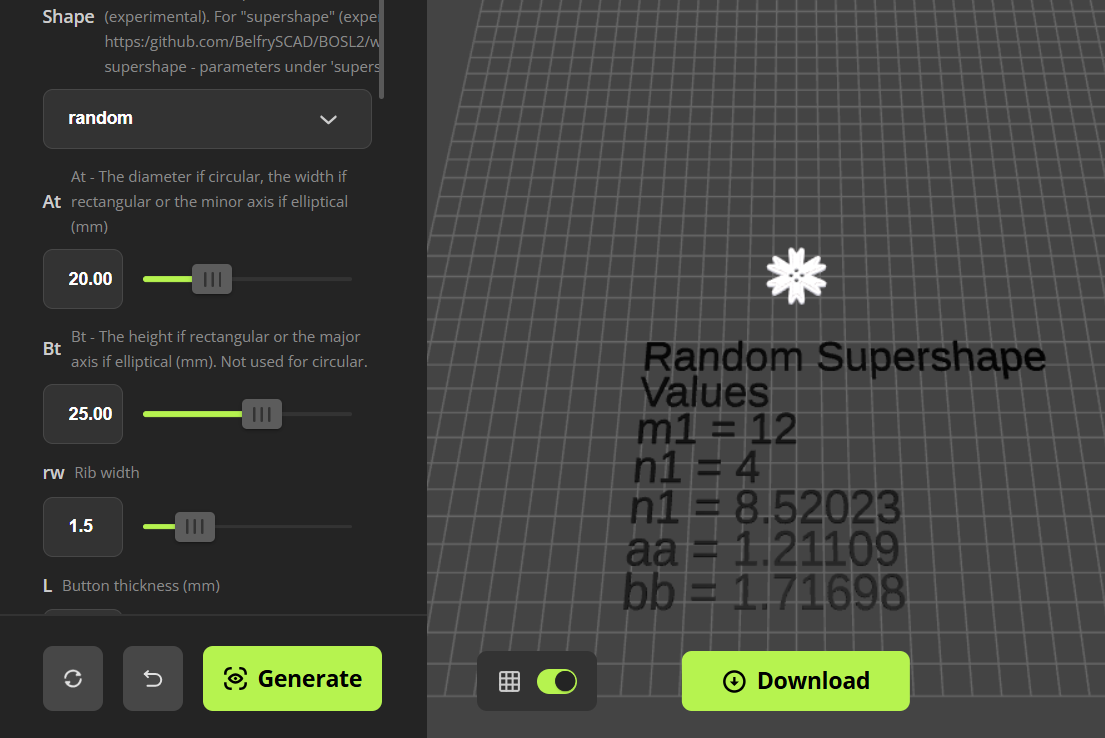
- Note - Supershape and Random may generate buttons that are not useable.
- To get the optimised print settings I use for the buttons do the following
- Download the print profile attached to this model in Bambu Studio
- Configure and generate you custom button
- Download the 3mf file from the generator
- Create a new plate in Bambu Studio
- Load the generated 3mf file (geometry only) to the new plate
- Select your filament
- Slice and print
Feedback and suggestions are welcomed!
See my other “useful generators”…
If you like my designs and find them useful please
or even better Buy Me A Coffee
Enjoy!
Design by WardCons on MakerWorld (license: BY-SA).